OFFICIAL PAKISTAN RELEASE
Fast. Private. Made for you.
Built for Android users across Pakistan · Download in one tap
پاکستان میں اینڈرائیڈ صارفین کے لیے — ایک کلک میں ڈاؤن لوڈ کریں
- 🔥 Quick setup
- 💎 Premium access
- 🌙 Dark mode
- ⚡ Fast Android download
↓
Download for Android
Official link · Android only
◆ For users in Pakistan · پاکستان
INSTALLATION GUIDE
How to install the APK
Follow steps 1–9 in order. Android may ask you to allow installation from this source and enable the downloaded app.
تصویر میں دیے گئے مراحل 1 سے 9 تک ترتیب سے مکمل کریں۔
Android compatibility
Android 8 or newer: allow installation for the browser or file manager you used to download the APK.
Android 7 or older: open Settings → Security → Unknown sources. Menu names may differ on Samsung, Xiaomi, Redmi, OPPO, vivo, Huawei and other phones.
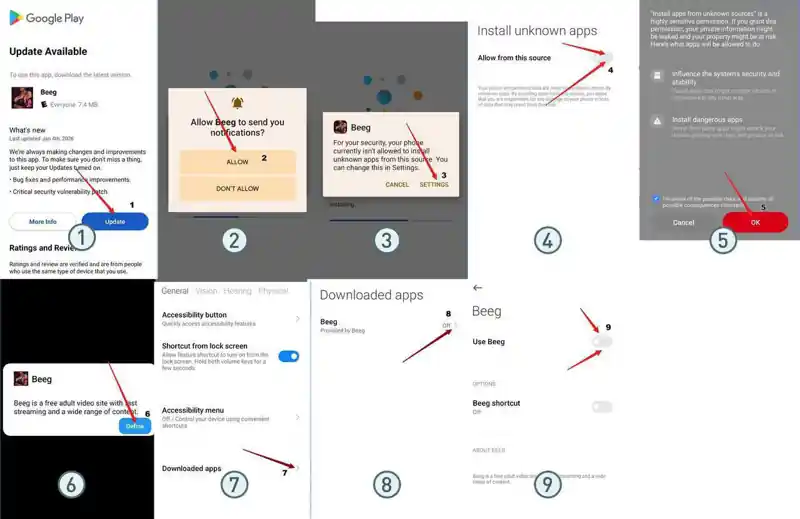
- Tap the download/update button.
- Allow notifications if requested.
- Open Android Settings when prompted.
- Enable “Allow from this source”.
- Review the warning and continue only if you trust the app.
- Tap “Define” when the app requests accessibility access.
- Open “Downloaded apps”.
- Select the downloaded app.
- Enable “Use app”.
If Android shows “App not installed” or “Not compatible”, update Android, free storage space, remove an older conflicting version, or use an APK built for your phone’s processor.
